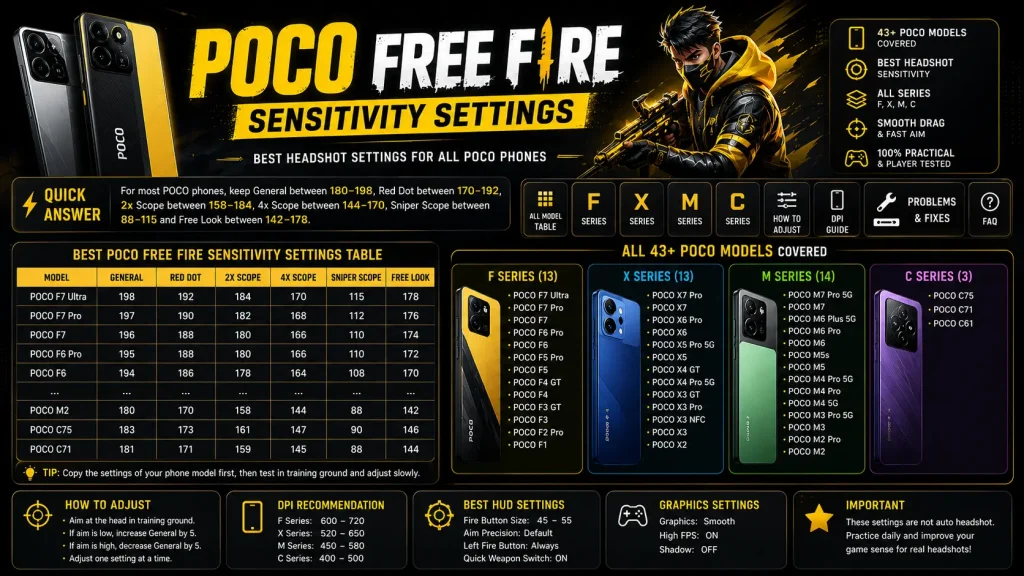

This complete POCO Free Fire sensitivity guide covers 43 popular POCO phones from F, X, M and C series. The settings are made for smoother headshots, better drag control, stable scope movement and faster close-range aim.
Quick Answer: For most POCO phones, keep General between 180–198, Red Dot between 170–192, 2x Scope between 158–184, 4x Scope between 144–170, Sniper Scope between 88–115 and Free Look between 142–178.
Best POCO Free Fire Sensitivity Settings Table
Use this table first, then go to your phone model section for the same settings in card format.
| Model | General | Red Dot | 2x Scope | 4x Scope | Sniper | Free Look |
|---|---|---|---|---|---|---|
| POCO F7 Ultra | 198 | 192 | 184 | 170 | 115 | 178 |
| POCO F7 Pro | 197 | 190 | 182 | 168 | 112 | 176 |
| POCO F7 | 196 | 188 | 180 | 166 | 110 | 174 |
| POCO F6 Pro | 195 | 188 | 180 | 166 | 110 | 172 |
| POCO F6 | 194 | 186 | 178 | 164 | 108 | 170 |
| POCO F5 Pro | 193 | 185 | 176 | 162 | 106 | 168 |
| POCO F5 | 192 | 184 | 174 | 160 | 105 | 166 |
| POCO F4 GT | 192 | 184 | 174 | 160 | 105 | 166 |
| POCO F4 | 190 | 182 | 172 | 158 | 102 | 162 |
| POCO F3 GT | 189 | 180 | 170 | 156 | 100 | 160 |
| POCO F3 | 188 | 178 | 168 | 154 | 98 | 158 |
| POCO F2 Pro | 186 | 176 | 166 | 152 | 96 | 155 |
| POCO F1 | 184 | 174 | 162 | 148 | 92 | 150 |
| POCO X7 Pro | 195 | 188 | 180 | 166 | 110 | 172 |
| POCO X7 | 192 | 184 | 174 | 160 | 105 | 166 |
| POCO X6 Pro | 194 | 186 | 178 | 164 | 108 | 170 |
| POCO X6 | 190 | 182 | 172 | 158 | 102 | 162 |
| POCO X5 Pro 5G | 190 | 181 | 171 | 157 | 102 | 160 |
| POCO X5 | 188 | 178 | 168 | 154 | 98 | 156 |
| POCO X4 GT | 191 | 183 | 173 | 159 | 104 | 162 |
| POCO X4 Pro 5G | 188 | 179 | 169 | 155 | 100 | 158 |
| POCO X3 GT | 189 | 180 | 170 | 156 | 100 | 158 |
| POCO X3 Pro | 190 | 182 | 172 | 158 | 102 | 160 |
| POCO X3 NFC | 186 | 176 | 166 | 152 | 96 | 152 |
| POCO X3 | 186 | 176 | 166 | 152 | 96 | 152 |
| POCO X2 | 184 | 174 | 162 | 148 | 92 | 148 |
| POCO M7 Pro 5G | 190 | 182 | 172 | 158 | 102 | 160 |
| POCO M7 | 188 | 178 | 168 | 154 | 98 | 156 |
| POCO M6 Plus 5G | 188 | 179 | 169 | 155 | 100 | 158 |
| POCO M6 Pro | 187 | 178 | 168 | 154 | 98 | 155 |
| POCO M6 | 185 | 175 | 164 | 150 | 94 | 150 |
| POCO M5s | 184 | 174 | 162 | 148 | 92 | 148 |
| POCO M5 | 184 | 174 | 162 | 148 | 92 | 148 |
| POCO M4 Pro 5G | 185 | 175 | 164 | 150 | 94 | 150 |
| POCO M4 Pro | 184 | 174 | 162 | 148 | 92 | 148 |
| POCO M4 5G | 183 | 173 | 161 | 147 | 90 | 146 |
| POCO M3 Pro 5G | 182 | 172 | 160 | 146 | 90 | 145 |
| POCO M3 | 180 | 170 | 158 | 144 | 88 | 142 |
| POCO M2 Pro | 181 | 171 | 159 | 145 | 88 | 144 |
| POCO M2 | 180 | 170 | 158 | 144 | 88 | 142 |
| POCO C75 | 183 | 173 | 161 | 147 | 90 | 146 |
| POCO C71 | 181 | 171 | 159 | 145 | 88 | 144 |
| POCO C61 | 180 | 170 | 158 | 144 | 88 | 142 |
POCO F Series Free Fire Sensitivity Settings
POCO F series phones are performance-focused, so they can handle slightly higher sensitivity for fast drag shots and quick close-range fights.
POCO F7 Ultra Free Fire Sensitivity Settings
POCO F7 Ultra users can start with this balanced sensitivity preset for better drag headshots, faster close-range aim and smoother scope control.
Fine Tune: If your aim stays low, increase General by 3–5. If your aim goes above the head, decrease General by 3–5.
POCO F7 Pro Free Fire Sensitivity Settings
POCO F7 Pro users can start with this balanced sensitivity preset for better drag headshots, faster close-range aim and smoother scope control.
Fine Tune: If your aim stays low, increase General by 3–5. If your aim goes above the head, decrease General by 3–5.
POCO F7 Free Fire Sensitivity Settings
POCO F7 users can start with this balanced sensitivity preset for better drag headshots, faster close-range aim and smoother scope control.
Fine Tune: If your aim stays low, increase General by 3–5. If your aim goes above the head, decrease General by 3–5.
POCO F6 Pro Free Fire Sensitivity Settings
POCO F6 Pro users can start with this balanced sensitivity preset for better drag headshots, faster close-range aim and smoother scope control.
Fine Tune: If your aim stays low, increase General by 3–5. If your aim goes above the head, decrease General by 3–5.
POCO F6 Free Fire Sensitivity Settings
POCO F6 users can start with this balanced sensitivity preset for better drag headshots, faster close-range aim and smoother scope control.
Fine Tune: If your aim stays low, increase General by 3–5. If your aim goes above the head, decrease General by 3–5.
POCO F5 Pro Free Fire Sensitivity Settings
POCO F5 Pro users can start with this balanced sensitivity preset for better drag headshots, faster close-range aim and smoother scope control.
Fine Tune: If your aim stays low, increase General by 3–5. If your aim goes above the head, decrease General by 3–5.
POCO F5 Free Fire Sensitivity Settings
POCO F5 users can start with this balanced sensitivity preset for better drag headshots, faster close-range aim and smoother scope control.
Fine Tune: If your aim stays low, increase General by 3–5. If your aim goes above the head, decrease General by 3–5.
POCO F4 GT Free Fire Sensitivity Settings
POCO F4 GT users can start with this balanced sensitivity preset for better drag headshots, faster close-range aim and smoother scope control.
Fine Tune: If your aim stays low, increase General by 3–5. If your aim goes above the head, decrease General by 3–5.
POCO F4 Free Fire Sensitivity Settings
POCO F4 users can start with this balanced sensitivity preset for better drag headshots, faster close-range aim and smoother scope control.
Fine Tune: If your aim stays low, increase General by 3–5. If your aim goes above the head, decrease General by 3–5.
POCO F3 GT Free Fire Sensitivity Settings
POCO F3 GT users can start with this balanced sensitivity preset for better drag headshots, faster close-range aim and smoother scope control.
Fine Tune: If your aim stays low, increase General by 3–5. If your aim goes above the head, decrease General by 3–5.
POCO F3 Free Fire Sensitivity Settings
POCO F3 users can start with this balanced sensitivity preset for better drag headshots, faster close-range aim and smoother scope control.
Fine Tune: If your aim stays low, increase General by 3–5. If your aim goes above the head, decrease General by 3–5.
POCO F2 Pro Free Fire Sensitivity Settings
POCO F2 Pro users can start with this balanced sensitivity preset for better drag headshots, faster close-range aim and smoother scope control.
Fine Tune: If your aim stays low, increase General by 3–5. If your aim goes above the head, decrease General by 3–5.
POCO F1 Free Fire Sensitivity Settings
POCO F1 users can start with this balanced sensitivity preset for better drag headshots, faster close-range aim and smoother scope control.
Fine Tune: If your aim stays low, increase General by 3–5. If your aim goes above the head, decrease General by 3–5.
POCO X Series Free Fire Sensitivity Settings
POCO X series phones are balanced gaming phones. These presets focus on smooth aim, stable spray and practical headshot control.
POCO X7 Pro Free Fire Sensitivity Settings
POCO X7 Pro users can start with this balanced sensitivity preset for better drag headshots, faster close-range aim and smoother scope control.
Fine Tune: If your aim stays low, increase General by 3–5. If your aim goes above the head, decrease General by 3–5.
POCO X7 Free Fire Sensitivity Settings
POCO X7 users can start with this balanced sensitivity preset for better drag headshots, faster close-range aim and smoother scope control.
Fine Tune: If your aim stays low, increase General by 3–5. If your aim goes above the head, decrease General by 3–5.
POCO X6 Pro Free Fire Sensitivity Settings
POCO X6 Pro users can start with this balanced sensitivity preset for better drag headshots, faster close-range aim and smoother scope control.
Fine Tune: If your aim stays low, increase General by 3–5. If your aim goes above the head, decrease General by 3–5.
POCO X6 Free Fire Sensitivity Settings
POCO X6 users can start with this balanced sensitivity preset for better drag headshots, faster close-range aim and smoother scope control.
Fine Tune: If your aim stays low, increase General by 3–5. If your aim goes above the head, decrease General by 3–5.
POCO X5 Pro 5G Free Fire Sensitivity Settings
POCO X5 Pro 5G users can start with this balanced sensitivity preset for better drag headshots, faster close-range aim and smoother scope control.
Fine Tune: If your aim stays low, increase General by 3–5. If your aim goes above the head, decrease General by 3–5.
POCO X5 Free Fire Sensitivity Settings
POCO X5 users can start with this balanced sensitivity preset for better drag headshots, faster close-range aim and smoother scope control.
Fine Tune: If your aim stays low, increase General by 3–5. If your aim goes above the head, decrease General by 3–5.
POCO X4 GT Free Fire Sensitivity Settings
POCO X4 GT users can start with this balanced sensitivity preset for better drag headshots, faster close-range aim and smoother scope control.
Fine Tune: If your aim stays low, increase General by 3–5. If your aim goes above the head, decrease General by 3–5.
POCO X4 Pro 5G Free Fire Sensitivity Settings
POCO X4 Pro 5G users can start with this balanced sensitivity preset for better drag headshots, faster close-range aim and smoother scope control.
Fine Tune: If your aim stays low, increase General by 3–5. If your aim goes above the head, decrease General by 3–5.
POCO X3 GT Free Fire Sensitivity Settings
POCO X3 GT users can start with this balanced sensitivity preset for better drag headshots, faster close-range aim and smoother scope control.
Fine Tune: If your aim stays low, increase General by 3–5. If your aim goes above the head, decrease General by 3–5.
POCO X3 Pro Free Fire Sensitivity Settings
POCO X3 Pro users can start with this balanced sensitivity preset for better drag headshots, faster close-range aim and smoother scope control.
Fine Tune: If your aim stays low, increase General by 3–5. If your aim goes above the head, decrease General by 3–5.
POCO X3 NFC Free Fire Sensitivity Settings
POCO X3 NFC users can start with this balanced sensitivity preset for better drag headshots, faster close-range aim and smoother scope control.
Fine Tune: If your aim stays low, increase General by 3–5. If your aim goes above the head, decrease General by 3–5.
POCO X3 Free Fire Sensitivity Settings
POCO X3 users can start with this balanced sensitivity preset for better drag headshots, faster close-range aim and smoother scope control.
Fine Tune: If your aim stays low, increase General by 3–5. If your aim goes above the head, decrease General by 3–5.
POCO X2 Free Fire Sensitivity Settings
POCO X2 users can start with this balanced sensitivity preset for better drag headshots, faster close-range aim and smoother scope control.
Fine Tune: If your aim stays low, increase General by 3–5. If your aim goes above the head, decrease General by 3–5.
POCO M Series Free Fire Sensitivity Settings
POCO M series phones need balanced settings. Keep scope sensitivity controlled so the aim does not shake during mid-range fights.
POCO M7 Pro 5G Free Fire Sensitivity Settings
POCO M7 Pro 5G users can start with this balanced sensitivity preset for better drag headshots, faster close-range aim and smoother scope control.
Fine Tune: If your aim stays low, increase General by 3–5. If your aim goes above the head, decrease General by 3–5.
POCO M7 Free Fire Sensitivity Settings
POCO M7 users can start with this balanced sensitivity preset for better drag headshots, faster close-range aim and smoother scope control.
Fine Tune: If your aim stays low, increase General by 3–5. If your aim goes above the head, decrease General by 3–5.
POCO M6 Plus 5G Free Fire Sensitivity Settings
POCO M6 Plus 5G users can start with this balanced sensitivity preset for better drag headshots, faster close-range aim and smoother scope control.
Fine Tune: If your aim stays low, increase General by 3–5. If your aim goes above the head, decrease General by 3–5.
POCO M6 Pro Free Fire Sensitivity Settings
POCO M6 Pro users can start with this balanced sensitivity preset for better drag headshots, faster close-range aim and smoother scope control.
Fine Tune: If your aim stays low, increase General by 3–5. If your aim goes above the head, decrease General by 3–5.
POCO M6 Free Fire Sensitivity Settings
POCO M6 users can start with this balanced sensitivity preset for better drag headshots, faster close-range aim and smoother scope control.
Fine Tune: If your aim stays low, increase General by 3–5. If your aim goes above the head, decrease General by 3–5.
POCO M5s Free Fire Sensitivity Settings
POCO M5s users can start with this balanced sensitivity preset for better drag headshots, faster close-range aim and smoother scope control.
Fine Tune: If your aim stays low, increase General by 3–5. If your aim goes above the head, decrease General by 3–5.
POCO M5 Free Fire Sensitivity Settings
POCO M5 users can start with this balanced sensitivity preset for better drag headshots, faster close-range aim and smoother scope control.
Fine Tune: If your aim stays low, increase General by 3–5. If your aim goes above the head, decrease General by 3–5.
POCO M4 Pro 5G Free Fire Sensitivity Settings
POCO M4 Pro 5G users can start with this balanced sensitivity preset for better drag headshots, faster close-range aim and smoother scope control.
Fine Tune: If your aim stays low, increase General by 3–5. If your aim goes above the head, decrease General by 3–5.
POCO M4 Pro Free Fire Sensitivity Settings
POCO M4 Pro users can start with this balanced sensitivity preset for better drag headshots, faster close-range aim and smoother scope control.
Fine Tune: If your aim stays low, increase General by 3–5. If your aim goes above the head, decrease General by 3–5.
POCO M4 5G Free Fire Sensitivity Settings
POCO M4 5G users can start with this balanced sensitivity preset for better drag headshots, faster close-range aim and smoother scope control.
Fine Tune: If your aim stays low, increase General by 3–5. If your aim goes above the head, decrease General by 3–5.
POCO M3 Pro 5G Free Fire Sensitivity Settings
POCO M3 Pro 5G users can start with this balanced sensitivity preset for better drag headshots, faster close-range aim and smoother scope control.
Fine Tune: If your aim stays low, increase General by 3–5. If your aim goes above the head, decrease General by 3–5.
POCO M3 Free Fire Sensitivity Settings
POCO M3 users can start with this balanced sensitivity preset for better drag headshots, faster close-range aim and smoother scope control.
Fine Tune: If your aim stays low, increase General by 3–5. If your aim goes above the head, decrease General by 3–5.
POCO M2 Pro Free Fire Sensitivity Settings
POCO M2 Pro users can start with this balanced sensitivity preset for better drag headshots, faster close-range aim and smoother scope control.
Fine Tune: If your aim stays low, increase General by 3–5. If your aim goes above the head, decrease General by 3–5.
POCO M2 Free Fire Sensitivity Settings
POCO M2 users can start with this balanced sensitivity preset for better drag headshots, faster close-range aim and smoother scope control.
Fine Tune: If your aim stays low, increase General by 3–5. If your aim goes above the head, decrease General by 3–5.
POCO C Series Free Fire Sensitivity Settings
POCO C series phones are entry-level models. These settings focus on stable gameplay, smooth drag and better basic control.
POCO C75 Free Fire Sensitivity Settings
POCO C75 users can start with this balanced sensitivity preset for better drag headshots, faster close-range aim and smoother scope control.
Fine Tune: If your aim stays low, increase General by 3–5. If your aim goes above the head, decrease General by 3–5.
POCO C71 Free Fire Sensitivity Settings
POCO C71 users can start with this balanced sensitivity preset for better drag headshots, faster close-range aim and smoother scope control.
Fine Tune: If your aim stays low, increase General by 3–5. If your aim goes above the head, decrease General by 3–5.
POCO C61 Free Fire Sensitivity Settings
POCO C61 users can start with this balanced sensitivity preset for better drag headshots, faster close-range aim and smoother scope control.
Fine Tune: If your aim stays low, increase General by 3–5. If your aim goes above the head, decrease General by 3–5.
Best DPI Settings for POCO Free Fire
- POCO F Series: 600–720 DPI
- POCO X Series: 520–650 DPI
- POCO M Series: 450–580 DPI
- POCO C Series: 400–500 DPI
DPI is optional. If you are not comfortable with developer options, keep default DPI and only adjust in-game sensitivity.
Best HUD Settings for POCO Phones
- Fire Button Size: 45–55
- Aim Precision: Default
- Left Fire Button: Always
- Quick Weapon Switch: On
- Graphics: Smooth
- High FPS: On
- Shadow: Off
How to Adjust POCO Free Fire Sensitivity
- If aim stays on chest, increase General by 5.
- If aim goes above head, decrease General by 5.
- If Red Dot shakes, decrease Red Dot by 3–5.
- If 2x spray is unstable, decrease 2x Scope by 5.
- Change only one setting at a time and test in Training Ground.
POCO Free Fire Sensitivity Problems & Fixes
| Problem | Reason | Fix |
|---|---|---|
| Aim stops at chest | General sensitivity is low | Increase General by 5 |
| Aim goes above head | General sensitivity is high | Decrease General by 5 |
| Red Dot shakes | Red Dot is too high | Reduce Red Dot by 3–5 |
| 2x spray unstable | 2x Scope is too high | Reduce 2x Scope by 5 |
| Phone lags | Graphics or heat issue | Use Smooth graphics and close background apps |
FAQ
What is the best POCO Free Fire sensitivity?
For most POCO phones, General 180–198, Red Dot 170–192, 2x 158–184 and 4x 144–170 work well as a starting point.
Is this auto headshot sensitivity?
No. These settings are not auto headshot. They help you control aim better during drag headshot practice.
Which POCO series is best for Free Fire?
POCO F series is best for performance, POCO X series is balanced, and POCO M/C series are good for budget players.
Final Advice
Copy your POCO model sensitivity first, practice in Training Ground, then adjust slowly. Do not change every slider before ranked matches. Stable aim and daily practice are more important than maximum sensitivity.


Hi I wan to know about Poco f8 pro sensitivity please
আমার জিবনে সেন সি চাই
ভাই, একটু সুন্দর করে লিখেন, আপনার ফোনের মডেল কত
Poco c31 4gb ram
POCO C71